โœฆ Embedded Linux ยท Community Edition โ€” Raspberry Pi

The missing platform
for Embedded Linux

OrbitOS transforms embedded Linux devices into a programmable ecosystem. Access hardware, networking, and system services locally or remotely, with built-in security and real-time control.

๐Ÿšง Full website under construction ยท Community Edition launching soon
โฌก
OTA Apps SDK Edge

Every embedded project
reinvents the same infrastructure.

Reading GPIO, configuring networking, securing remote access, handling OTA updates and building APIs โ€” every team ends up writing the same platform code again and again. OrbitOS provides that platform.

One runtime. All hardware.

Access and control your device from any language, locally or remotely.

๐Ÿ”Œ

One API for All Hardware

OrbitOS exposes device capabilities as APIs you can call from apps or tools โ€” locally via UDS or remotely via TCP/mTLS. GPIO, PWM, IยฒC, SPI, UART, WiFi, Ethernet, Bluetooth and network controls all work consistently across every OrbitOS device.

๐Ÿ”

Security by Default

Every connection is encrypted and authenticated. OrbitOS verifies every caller before granting access โ€” no open ports, no implicit trust. Safe for field and industrial deployments.

๐Ÿ“ฆ

Isolated Apps

Applications run in isolation and communicate through defined interfaces. If an app fails, the runtime restarts it automatically โ€” giving you reliability and maintainability.

๐Ÿ”„

Atomic OS Updates

OSTree-backed updates with delta downloads, instant rollback and zero-downtime upgrades. Devices can safely update in the field without risk of bricking.

๐ŸŒ

Multi-Language SDK

Develop applications in Go, Python, Java or C++. Apps are packaged into a unified .orb format ensuring consistent deployment across any OrbitOS device.

๐Ÿ’ป

Real-Time Remote Development

Develop against real hardware without deploying first. Run your application directly from your laptop while interacting with device peripherals in real time using the same SDK and APIs. Develop locally. Test on real hardware. Deploy when ready.

โšก

Edge-Ready Runtime

OrbitOS is designed for embedded and edge systems. Efficient runtime services allow apps to run on resource-constrained devices while maintaining modern development capabilities.

Built like Android.
For the edge.

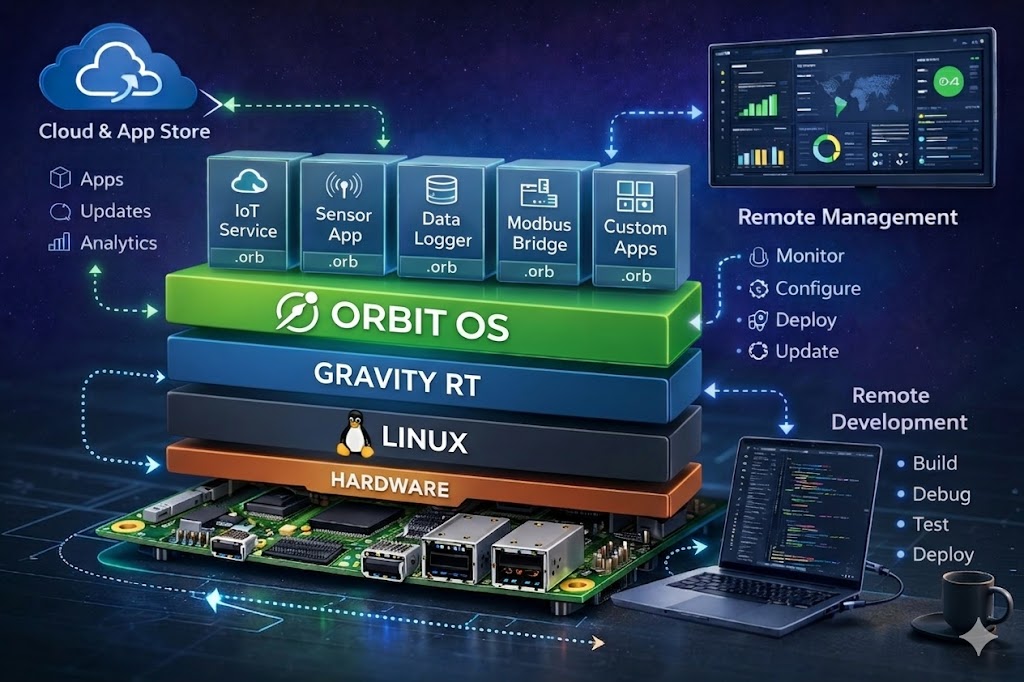
Gravity RT โ€” the core of OrbitOS โ€” runs your applications, controls hardware, and enforces security in a single unified runtime. OrbitOS exposes device capabilities as APIs you can call from apps or tools โ€” locally or remotely, with security built in. Every request is verified before access is granted.

OrbitOS architecture diagram โ€” Hardware, Linux, Gravity RT, OrbitOS runtime, .orb apps, Cloud Store, Remote Management and Remote Development

Supported Devices

Raspberry Pi 2 / 3 / 4 / 5 Arduino UNO Q BeagleBone Black / AI NVIDIA Jetson Nano / Xavier Rock Pi 4 / 5 Odroid N2+ Banana Pi M2 / M5 / M7 x86_64 SBCs & NUCs

Architectures

ARM64 (aarch64) ARM32 (ARMv7) x86_64
Unified API & Packages
Secure Local & Remote Access
App Store Install & Update Apps
Safe System Updates

Application Store

Browse, install, and manage applications from a central store. Each app is verified and encrypted, ensuring trusted deployment on your devices.

๐Ÿ›’

Secure App Store

Users can browse and install apps safely from a centralized store.

๐Ÿ”

Verified Packages

Apps are packaged in .orb format and cryptographically verified before installation.

โš™๏ธ

Atomic Install & Updates

Installations and updates are transactional โ€” complete fully or rollback automatically.

๐Ÿ”„

Managed Lifecycle

The runtime manages app lifecycle: start, stop, supervise apps automatically, with granular permissions.

Talk to your device like an API

Connect from any machine. Control hardware. In any language.

// Connect โ€” UDS on-device or TCP remotely, same API
device, _ := sdk.NewClientAuto(DEVICE_IP_ADDRESS)
defer device.Close()

// GPIO โ€” set direction and drive a pin high
led := sdk.GpioPin{Number: 18, ChipNumber: 0}
device.GpioManager.SetDirection(led, true)   // OUTPUT
device.GpioManager.SetLevel(led, true)        // HIGH

// PWM โ€” 1 kHz signal at 50% duty cycle
pwmPins, _ := device.GpioManager.ListPwmPins()
device.GpioManager.SetPwm(pwmPins[0], 0.5, 1000.0)

// UART โ€” open ttyAMA0 at 115200 baud and send a command
device.UartManager.Open(sdk.UartConfig{Port: "/dev/ttyAMA0", Baudrate: 115200})
device.UartManager.Write("/dev/ttyAMA0", []byte("AT\r\n"))

// IยฒC โ€” scan bus and read a sensor register
addrs, _ := device.I2CManager.ScanBus(1)
data, _  := device.I2CManager.WriteRead(1, addrs[0], []byte{0x00}, 2)
GoAvailable
JavaBeta soon
PythonPlanned Q3
C++Planned Q4

Get Early Access

Be the first to know when the CommunityI